Knowing that a sensor changed state is different from understanding what is happening at home. Home Sense connects radar presence, room-level context, security profiles, camera viewing, energy information, and history in one application. Its design starts with a local installation and lets each home enable the modules it actually uses.
The distinctive work is in those connections: occupancy and alarm eligibility remain separate, an outdoor siren waits for a deliberate approval, a camera can be linked to a room by stable identity, and configuration survives software updates without requiring a custom fork. The Home Sense product page introduces the application; this article explores the engineering behind it.
Start with rooms, not a pile of MQTT readings
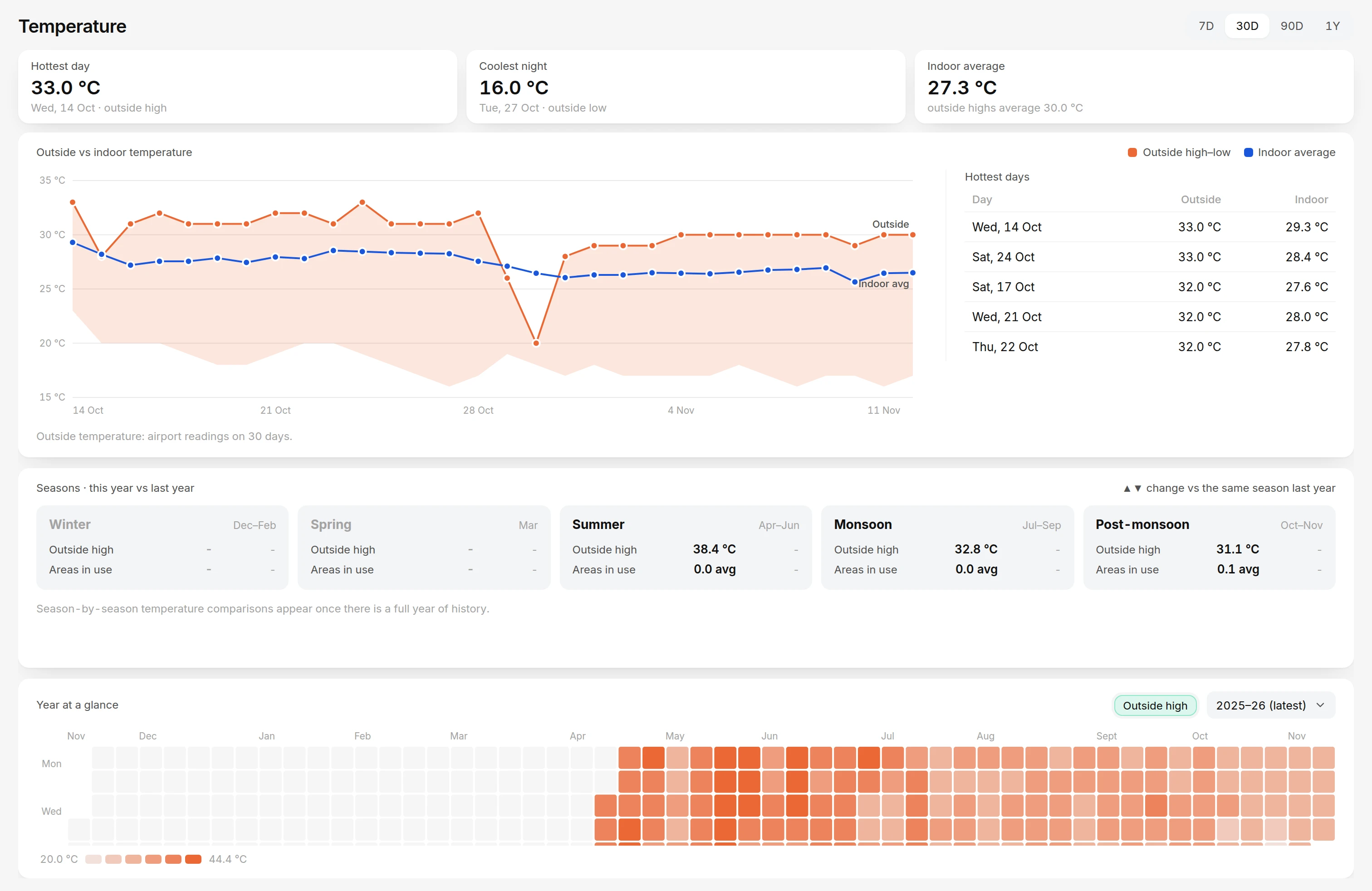
Home Sense supports mmWave radar nodes that report presence and range. The dashboard turns those readings into named areas, room occupancy, device state, and a history the household can inspect. It also keeps connection health visible, so an offline sensor does not quietly masquerade as a clear room.
A presence hold and a raw observation serve different purposes. A room can remain marked occupied briefly after the last reading without extending an alarm decision indefinitely. Home Sense keeps the server's occupancy state separate from the fresh radar evidence used by supported alert rules.
Optional alarm confirmation looks for coherent fresh observations before making an automatic alarm eligible. This is a configurable confidence heuristic, not person identification or a promise of zero misses. Retained or repeated stale telemetry must not manufacture confirmation simply because the same value remains on a message bus.
Follow a detection from the radar UART to the server
The supported radar path starts with an HLK-LD2420 in its simple text-output mode. The node reads its UART at 115200 baud and parses ON, OFF and Range <cm> lines. ESP32 targets use hardware serial; the ESP8266 target uses its supported software UART mapping. A range is a sensor reading, not an identified person's location or an exact count of occupants.
The firmware sets the radar module's own hold time to two seconds after detecting it. That keeps the module's raw state relatively responsive; the household's longer occupancy preference belongs to the server. The parser clears the previous distance when presence changes, so the next detection does not inherit the last target's range. Valid radar lines increment a source-sample counter. Random serial bytes and replayed network packets do not become new physical observations.
There are deliberately different publishing paths. Presence state supports the dashboard and ordinary state handling. Changed distance readings are rate-limited to at most five per second and require a change of at least five centimeters. A separate non-retained observation snapshot carries boot identity, monotonically increasing sequence, uptime, source-sample count, source age, radar health, presence and optional distance. While presence is active, the firmware attempts these snapshots approximately once a second; clear-state snapshots are less frequent.
LD2420 UART: ON / OFF / Range <cm>
  → supported ESP firmware parses fresh sensor lines
  → MQTT state + non-retained radar/observation snapshot
  → ingest validates identity, order and freshness
  → confirmed detection feeds occupancy, history and alert logic
The distinction becomes useful during a fault. If the radar stops producing valid data for ten seconds, the firmware marks its capability lost and clears a previously active raw presence state. A Wi-Fi connection can still be healthy while the attached radar is not. Conversely, a retained MQTT value can describe the previous state while proving nothing about whether the physical sensor is currently responding.
Use evidence age, not packet arrival alone
The server's alarm-confirmation object checks boot and sequence before accepting an observation. A repeated or older sequence in the same boot is ignored. A new boot resets the episode's accumulated evidence. The packet's source-sample count matters independently: receiving another snapshot of unchanged old sensor data does not add a fresh measurement to a confirmation window.
In the inspected implementation, a healthy packet must report a source age no greater than three seconds. An active modern observation also expires if updated telemetry or the last actual observation becomes older than 3.5 seconds. These are code thresholds for that path, not an assurance that every configured installation detects a person within that interval.
Confirmation can recognize several patterns. Coherent movement considers elapsed time, minimum sample count, travel versus net displacement and plausibility of successive ranges. Sustained presence looks for a cluster of credible ranges across a configured duration. Another supported route can handle fresh presence without range after its configured waiting period. Legacy telemetry follows a separate limited path. This makes the decision explainable without treating one noisy distance reading as a reliable alarm.
Occupancy has its own hold state. When confirmed presence clears, the server can keep the area occupied until its configured deadline. That state is persisted, so restarting a browser does not invent a new hold period. Repeated OFF messages must not keep extending the deadline. Radar lines and movement cues can clear while the room's occupancy label remains held: one is immediate evidence, the other is a deliberately smoothed household state.
Device health is another independent axis. Disabling a node clears functional state and blocks its alerts, while retaining health telemetry useful for diagnosis. Connection verification also distinguishes an unknown startup interval from a confirmed outage. These separations prevent “no fresh evidence,” “disabled,” “clear” and “occupied but held” from collapsing into the same reassuring green indicator.
Use a floor plan when it helps, not as a prerequisite
An installation can use a device dashboard without a floor plan. Profiles, schedules, notifications, settings, and history still work. That makes the system useful before someone has drawn the entire house or integrated every optional device.
When enabled, floor-plan views place live room and sensor information in geographic context within the home. Classic and interior views share the sensor overlay, so changing the presentation does not discard selection, occupancy, distance, or security state. The interior view loads on demand, and its lighting responds to measured light information rather than inventing a state for an offline sensor.
The application also treats an idle dashboard as an operating condition worth designing for. Decorative motion can pause while important live data and alarms continue. A wall display should not need continuous animation merely to communicate that the house is quiet.
Separate ordinary awareness from a disruptive alarm
Home, Night, and Away profiles control which areas are watched and how supported alerts behave. Scheduling and manual changes use the same persisted state, so the dashboard and another authorized control surface do not develop competing ideas of the active mode.
The distinction between indoor and outdoor sirens is deliberate. An eligible automatic alarm can sound the configured indoor warning, while an outdoor siren requires explicit approval. An unanswered request does not turn into an automatic approval after a timeout. The dashboard keeps the pending decision visible, and supported Telegram controls can answer the same request.
Manual siren controls distinguish indoor, outdoor, and combined actions. Stopping or silencing applies to the relevant active state, while late approval receives additional context before it can start an outdoor warning. These are product rules, not just button labels added to a relay command.
The approval gate is persisted server state, identified by a nonce and tied to the current profile and the time that mode began. An answer must match the current request and mode; the first valid decision wins. Changing the mode or answering a request makes a stale callback ineligible. Telegram actions additionally carry actor and destination checks. The dashboard uses the same decision path, so it is not a second, weaker implementation of the outdoor rule.
Late approval is handled explicitly. If the indoor warning has already ended and presence is clear or unknown, starting the outdoor warning requires an additional confirmation. An approved warning retains its intended duration after approval. This avoids treating an old notification as a timeless command to energize a relay, and keeps silence, stopping and disarming meaningful across control surfaces.
Bring the useful view to the event
Home Sense supports a camera grid, focused viewing, per-camera audio choices, and links between cameras and configured areas. Stable camera IDs keep those relationships intact when a display name or network address changes. The viewing path uses the application's authenticated relay instead of asking each browser to manage private camera credentials.
Doorbell inputs can be associated with ordered camera choices. An accepted press can capture a fresh image and a short clip, retain the event and actual capture times, and use the notification workflow to deliver supported media. Debouncing, deduplication, and cooldown handling prevent a held button or repeated transport message from becoming a series of false rings.
Presence-related evidence also has an explicit lifecycle. Captures and history are bounded, and a delayed event is not presented as though historical footage exists when it was never recorded. A live view, an event image, and a retained clip have different meanings; the application keeps those distinctions useful.
Evidence capture is scheduled work rather than an optimistic attachment added to an event. Jobs have deduplication identity and pending or recording state. Rooms sharing a camera can associate an ongoing alarm recording instead of creating redundant recordings. Periodic presence capture checks current verified presence, module enablement, configured area links and camera availability before queuing another job.
The worker keeps event time distinct from actual capture time. A photo is requested freshly from the configured stream; a video begins when recording starts. Neither implies pre-trigger footage. Retention pruning bounds stored evidence and media, while configuration and credentials remain separate. This gives the history a useful meaning: an event may have a real photo, a real clip, a failed capture or no recording, and the interface should represent that outcome accurately.
Add context without confusing forecasts with measurements
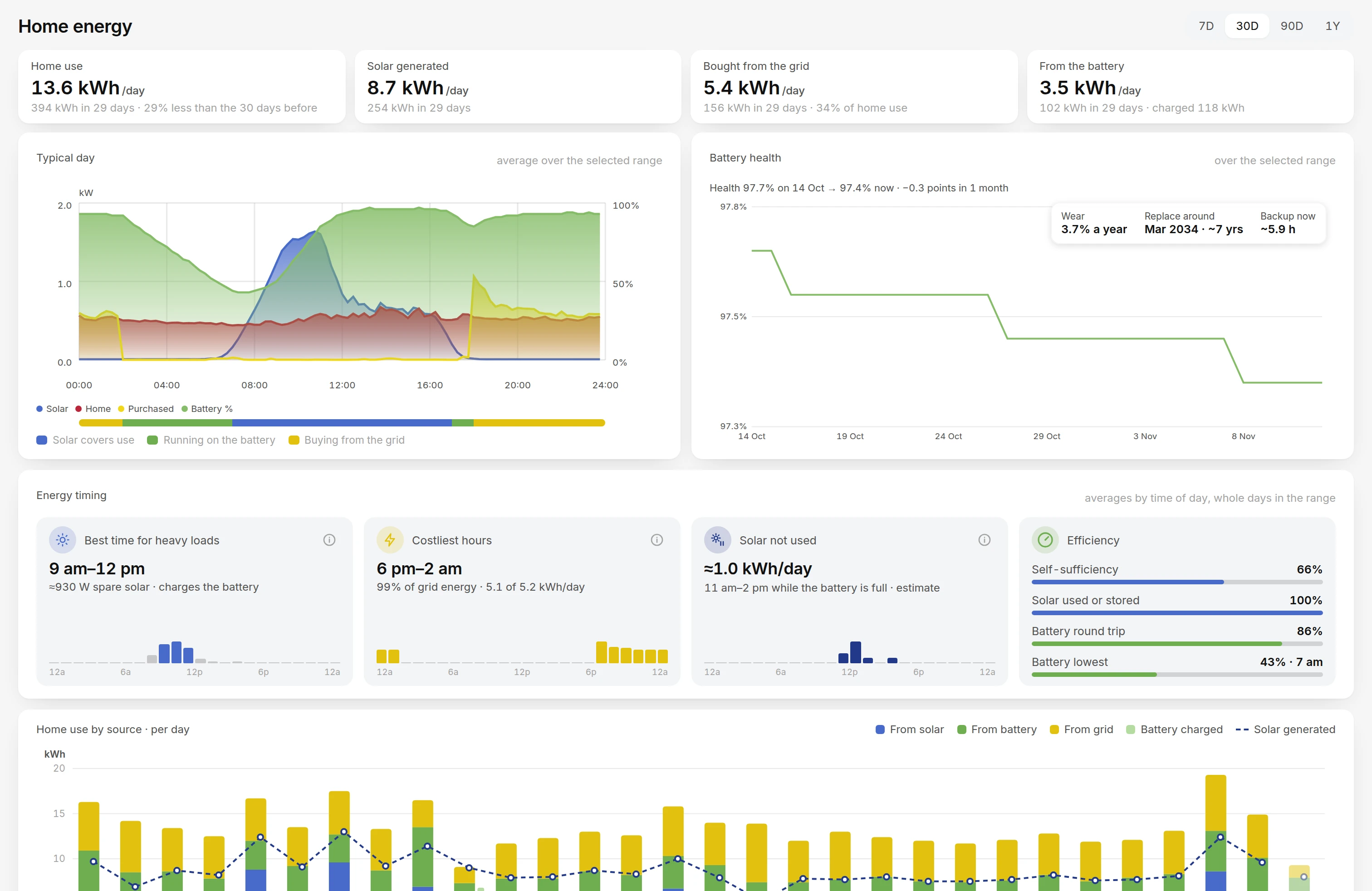
The optional solar integration presents energy flow, current household demand, historical curves, and battery information. It is a monitoring workflow: the interface does not imply control over an inverter simply because it can display its readings.
Battery alerts use fresh state and can distinguish reserve concerns, recovery, and supported backup-risk estimates. A chart showing yesterday's production should not overwrite the live house load, and a stale reading should not create a fresh battery warning. Those temporal distinctions matter as much as the flow diagram.
Weather follows a similar principle. Local probe readings take precedence where available, and the interface distinguishes measured past conditions from forecast values. Optional sources can contribute station observations, radar context, and model comparisons, with timestamps and uncertainty retained. Reduced solar output can offer context about sunshine; it is not itself a rainfall measurement.
Battery warnings use hysteresis too: the inspected low-battery path enters its low state below 30 percent and treats 35 percent as recovery, with additional lower steps handled separately. Freshness is checked before alerting. Backup-risk calculations also check the age of their individual battery and household-load inputs; combining summaries must not make an old measurement appear fresh. A runtime estimate is conditional on those inputs and history, not a guaranteed duration of backup power.
That read-only boundary extends to the integration itself. Device information and history are obtained through monitoring calls. Displaying solar power, battery state or an opportunity to schedule a heavy load does not imply that Home Sense issues inverter control commands. Weather and notification services can need external connectivity even while presence and the local dashboard belong to the installation.
Make the less dramatic signals useful too
Internet monitoring adds connection checks, confirmed outage and recovery state, throughput history, and manual or scheduled speed testing. Startup gaps and missing monitoring samples remain unknown rather than automatically becoming an ISP outage. That reduces the temptation to treat every interruption inside the monitoring system as a failure outside it.
Insights connects stored occupancy, activity patterns, temperatures, weather, and energy-related history. Users can inspect busy times, room occupancy patterns, and historical conditions without reading raw telemetry messages. The presentation also accounts for sparse data: a chart with no observations should not look like a genuine flat zero.
Modules can be disabled independently. Disabling an optional integration hides its interface and stops its background work while preserving the saved choices needed to enable it again. An installation does not need solar equipment, cameras, or a floor plan to benefit from the core presence workflow.
Treat device setup and recovery as part of the application
The browser setup workflow supports the project's firmware targets for ESP32-C3, ESP32-WROOM, and ESP8266 boards. Board-specific wiring information and supported capabilities come from shared hardware definitions, keeping the setup page and firmware aligned.
Stable internal device identity is separate from the editable name shown in a room. Device settings, enabled state, health readings, and registration participate in the same configuration model. Disabling a device can stop its functional alerts while retaining the health information useful for diagnosing it.
Installation configuration is kept separate from private accounts, credentials, and history. Supported settings can round-trip through recovery configuration, while private runtime data needs its own backup. Software updates are designed to preserve an installation's choices rather than replacing them with the maintainer's home layout.
A shared system with a native TV view
The project includes a native Android TV client that connects to the same server, reuses the product's design assets, and presents the dashboard and camera viewer with remote-friendly controls. It is not a separate household configuration or a web page wrapped in an embedded browser.
The core runtime brings its application services together in one container, while optional integrations are explicitly configured. This is a local-first architecture with optional external services, rather than a claim that every weather, notification, or energy integration works without outside connectivity.
Home Sense demonstrates the kind of product detail that makes connected devices useful together: meaningful freshness, clear state, recoverable settings, and deliberate actions around the signals that matter. Explore Home Sense or contact AlgoFly to discuss a connected-device application with its own hardware, workflows, and interface.