Imagine keeping your downloads and media on a home server, then using a browser on your laptop or phone to find a file, start a download, and watch a supported video without first copying it onto that device. That is the workflow behind Autolycus, our open-source, self-hosted download and media application.
This article focuses on one part of that experience: searching several torrent sources from a single page. Autolycus provides the interface you use; a separate tool called Jackett connects it to the sources being searched. Before getting into the streaming implementation, it helps to understand those two roles.
What are Autolycus and Jackett?
Autolycus is the application you run on your own server. It brings together a browser-based file manager, download controls, and media access. The server does the work, while your browser provides a way to manage it remotely. Its search interface sits alongside those existing features rather than being a standalone torrent website.
Jackett is the search adapter. Torrent indexers are services that catalogue torrent metadata. Different indexers expose different search pages and APIs. Jackett translates a query into the format each configured indexer expects and returns results through a common API. It does not download the files or replace Autolycus's file browser and media player.
A torrent result describes how to obtain content from peers. A magnet link identifies that content so a compatible downloader can locate it. A seed count is an indexer's report of peers offering a complete copy; it is an availability signal, not a guarantee that a download will succeed.
One search box, several sources, one download workflow
Suppose you are looking for a freely distributed Linux installation image. You enter its name in Autolycus. The server asks Jackett to search your configured indexers, then shows the matching entries with details such as size, seed count, and upload date. You can filter the results, inspect an entry, and hand the selected torrent or magnet link to Autolycus's download controls. The resulting file stays on your server for browsing or supported media playback.
Jackett handles the differences between sources. Autolycus handles the user-facing workflow: authentication, searching, filtering results, managing downloads, and working with the downloaded files. You configure the sources appropriate to your use case; neither tool provides a universal catalogue by itself.
The slowest source should not hold every result back
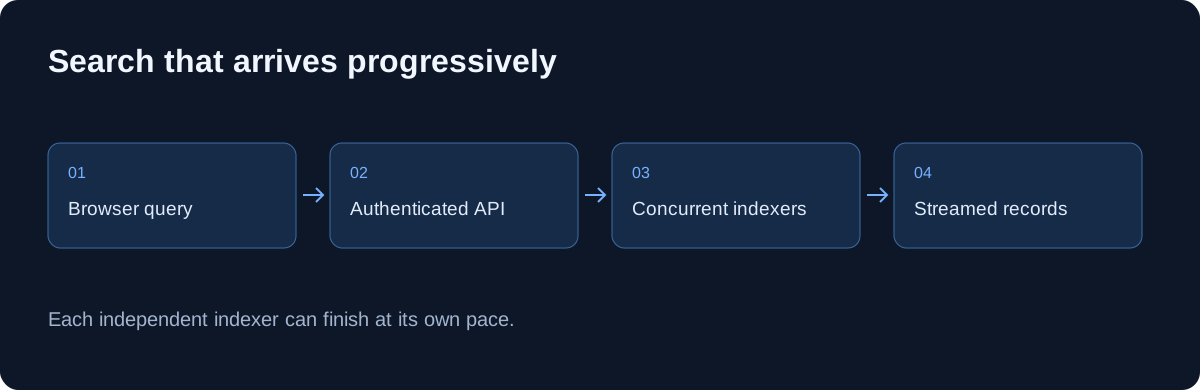
A search page feels slow when it stays empty until the slowest upstream service responds. That becomes noticeable when one query fans out to several independent indexers. Some return quickly; others time out. Combining everything into one final response makes the fastest source wait for the slowest.
Our video Build Your Own Torrent Search Engine with Jackett walks through the Autolycus update that makes results appear progressively. The sections below follow that public implementation: how requests run concurrently, how results reach the browser, and how filtering and partial failures work while the search continues.
What changed inside Autolycus
The video description places the new search interface alongside the existing file browser, downloads, and transcoding workflow. Its chapters move from the custom search engine at 02:20 to streaming results and filtering at 03:19, then a download and streaming demonstration at 05:36. Search is part of a larger workflow: find an item, inspect the available result, and hand it to the application's download controls.
Jackett provides adapters for different indexers behind a common API. Autolycus supplies its own authenticated application interface and Python client. Those responsibilities are separate: Jackett knows how to query a configured source; Autolycus decides how to schedule requests and present their results.
The feature matters for legitimate distributed content too, including open datasets and freely distributed software. The architecture does not depend on a particular media category.
From one query to several independent requests
The public AsyncJackett class first discovers configured indexers, then creates a task for each search. A semaphore limits active work; the inspected source defaults to 20 concurrent requests and a 20-second HTTP timeout. Those are implementation defaults, not a performance guarantee or a recommendation to enable every source available.
Responses are consumed with asyncio.as_completed. That detail is central: the client can process an indexer's result batch as soon as that request completes. It does not wait for the full task list to finish in submission order.
A simpler conceptual version looks like this. This is explanatory code, not a replacement for the repository's error handling and cleanup:
tasks = [asyncio.create_task(search_one(name, query)) for name in indexers]
try:
    for completed in asyncio.as_completed(tasks):
        batch = await completed
        for item in batch:
            yield item
finally:
    for task in tasks:
        task.cancel()
The response is a stream of records
The FastAPI search route authenticates the request and yields one JSON-encoded item followed by a newline. Although its declared media type is application/json, the actual response framing is newline-delimited records rather than one JSON array. A client must read chunks, preserve incomplete lines between chunks, and decode complete records individually.
Network chunks are arbitrary boundaries. One result can be split across reads, or several results can arrive in the same read. Calling JSON.parse on every raw chunk is therefore unreliable. An incremental parser maintains a text buffer and only parses a line after it sees the delimiter.
This changes time to first usable result, not necessarily the total time every upstream search takes. A slow indexer remains slow; it simply no longer prevents the reader from inspecting results that have already arrived.
Local filtering keeps the interface useful while results arrive
The video's description highlights fuzzy filtering and sorting by seed count, size, and upload date. Keeping these interactions local lets someone narrow the accumulated results without issuing another remote search for every keystroke. Newly arriving records still need to pass through the active filter and sort.
Result identity also deserves attention. Two indexers may describe the same underlying item differently. A robust interface separates an upstream row identifier from a content identifier, where one is available, instead of assuming the title is unique. Seed counts and availability are observations from the source, not promises that a download will complete.
The inspected backend emits only ordinary result records whose reported seed count is above zero. That is a deliberate relevance filter with a tradeoff: an item can be omitted even if its availability later changes.
Partial failure should be visible without discarding success
An indexer failure is returned as a structured record with __type: indexer_error. The record can identify an individual indexer or discovery itself. This lets the interface distinguish “no matching results” from “one source could not be searched.” Successful results from other sources remain useful.
The route also checks whether the browser disconnected and sets a cancellation event. The client cleans up outstanding tasks in a finally block. This matters when someone changes the search or leaves the page: abandoned requests should not keep using the same capacity as active searches.
A production proxy can buffer an otherwise incremental response. When validating a deployment, inspect whether records reach the browser progressively, not merely whether the endpoint eventually returns a successful status.
Keep deployment boundaries clear
The video also discusses optional proxy-related containers and the wider media streaming stack. Those are separate operational choices; they are not prerequisites for understanding the incremental search design. Keep Jackett's credentials on the server, restrict its administration interface, and expose application search through the application's authentication layer.
For a first deployment, configure a small set of sources you are authorized to use, check one successful query, then verify timeout and cancellation behavior. Measure first-result latency separately from total completion time. That makes it possible to tell whether a change improved the experience instead of merely changing a loading animation.
For the rest of the application, read our Autolycus overview. The search update is a useful example of a broader principle: make independently available work useful as soon as it is ready.